
Returns
The “Invoice from Conrad – One Creditor Model” does not affect the customer’s 14-day right of return. Moreover, all statutory warranties continue to apply.
Contents
Returns in the “Invoice from Conrad – One Creditor Model”
 What happens if the address is missing?
 Where to provide a return address
 Return address format
Returns: Receipts and Overview of returns
Returns: Item damage, lost parcels and related issues
Standard shipping: Item damage, lost parcels, bounces and related issues
 Creating a Return
Key differences between “Invoice from Conrad” and the original “Marketplace” model:
| Steps | Description |
|---|---|
Registering a Return | Customers register item returns via our company’s Returns gateway (Conrad Electronic » Your sourcing platform) |
Return label | We create a return label for the customer. |
Return address | DAt this point, we retrieve the return address directly from your Mirakl account. (“Returns” tab) If the return address is missing or invalid, the term for returns starts no earlier than on the day a valid address is provided. |
Address format | Important: Put the company name in the first line of the return address. Put the street name and the house number in the second address line called “Address (continued)”. |
Return Request | Registering a Return via the Conrad Returns Portal auto-generates a Return Request in Mirakl when the carrier scans the parcel for the first time. The Request entering the system means it has been approved already and is simply used to notify you of a return. |
Debit Note & Customer | The carrier scanning the parcel for the first time auto-generates a debit note for you and a credit note for the customer. Note: Please be aware that you will receive the debit notice BEFORE the returned item is delivered. Therefore, please wait until the return has been processed before contacting the accounting department with any questions regarding this matter. We offset these returns-related debit notes against your normal order invoicing, means no payment is required. |
The guidelines below cover all relevant information regarding returns.
⚠️ Important:
Providing a return address is mandatory!
To enable the automated returns process for you as a supplier on Mirakl and for customers in our webshop, first you must provide a valid returns address in your Mirakl account.
What happens if the address is missing?
If the return address is missing, your shop will be automatically suspended.
Where to provide a return address
Log on to your Mirakl account.
Go to Settings > Shop > Returns
Provide a valid return address. Fields marked with a red * are mandatory.
Return address format
Put the company name in the first line of the return address. Put the street name and the house number in the second address line called “Address (continued)”.
Customers register item returns via our company’s Returns gateway(Conrad Electronic » Your sourcing platform).
We generate a return label for the customer.
Registering a return via our Returns portal auto-creates a Return Request in Mirakl for you. The Request entering the system means it has been approved already and is simply used to notify you of a return.
You’ll get an email from Mirakl informing you of an accepted return request.
Moreover, your shop dashboard in Mirakl has a ‘Returns’ section. Click the number to view new returns.

Alternatively, navigate to the ‘Returns’ section via ‘Orders’ > Returns :
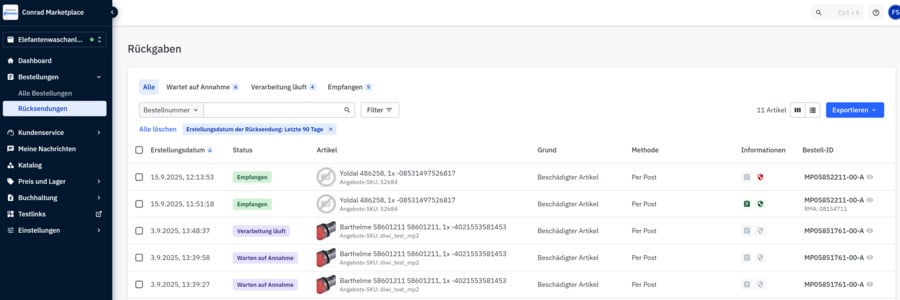
If you want to object to a return/to a debit note, you have two options:
The debit note contains the email address of our accounting team. Please use this email to object, and don’t forget to provide an explanation and supporting evidence (e.g. images).
Mirakl allows you to create and send a message to the operator regarding the respective order. Please choose “Object to return” as a reason.
IMPORTANT:
Don’t forget to provide an explanation and supporting evidence (e.g. images).
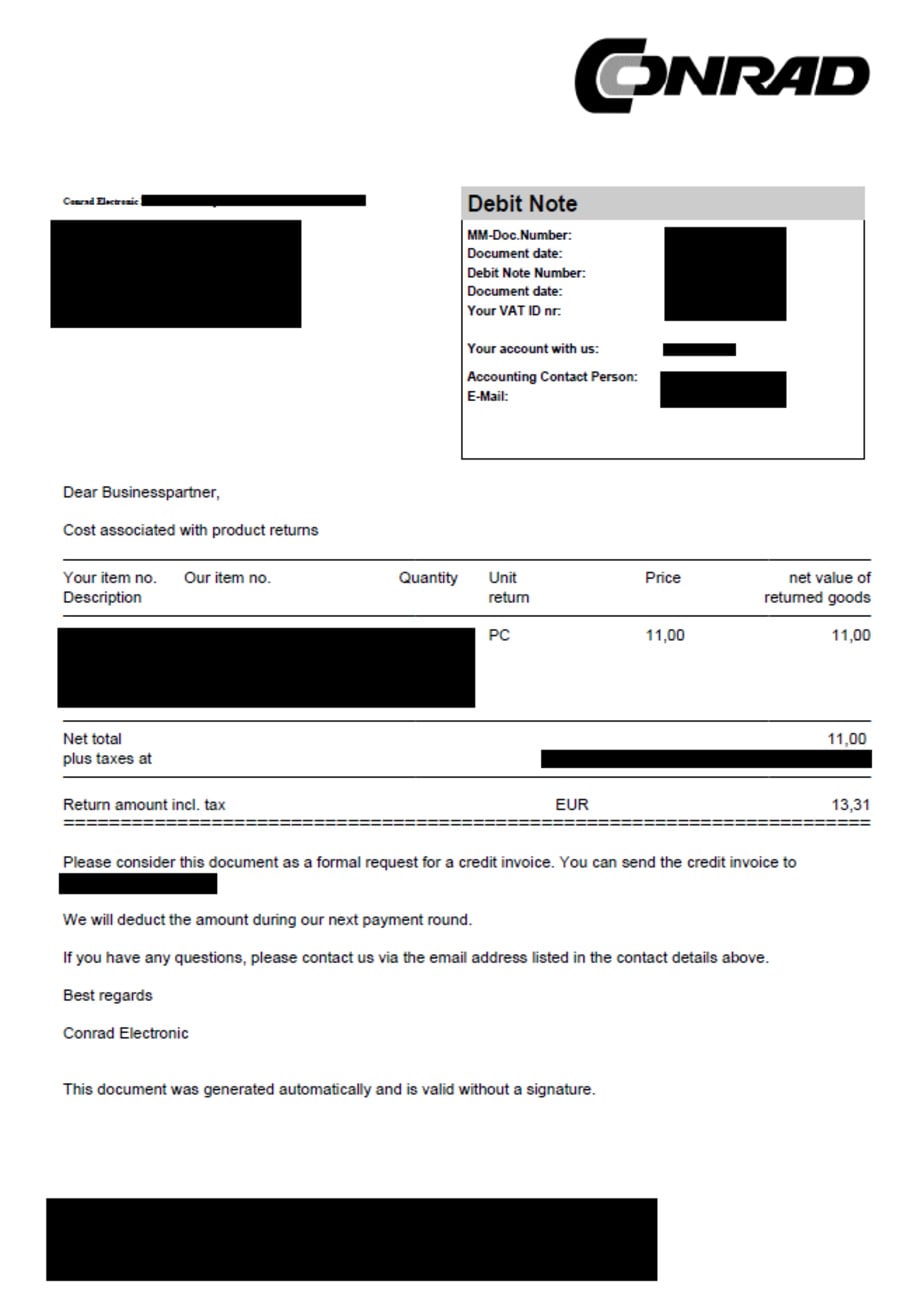
If you are notified of a return and it does not arrive, or arrives in bad conditions (e.g. for above reasons), you need to inform us immediately, choosing one of the two options mentioned above.
Standard shipments to customers may result in parcels being undeliverable, or in customers refusing delivery. If this happens, you need to create a Return in Mirakl so that our system can generate a debit note.
To do this, follow the steps below.
Manually creating a return
Go to the respective order and click “Further Action”🡺 “Create Return”:
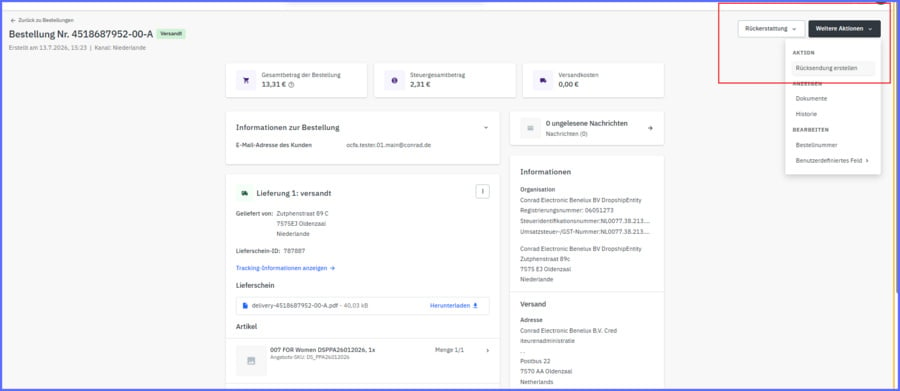
- Enter quantity
- Return method: Select “By post”
- Reason for return: Select “Other reason”
- Enter “Undeliverable” as the RMA number
Providing tracking details is not mandatory - Click “Create”
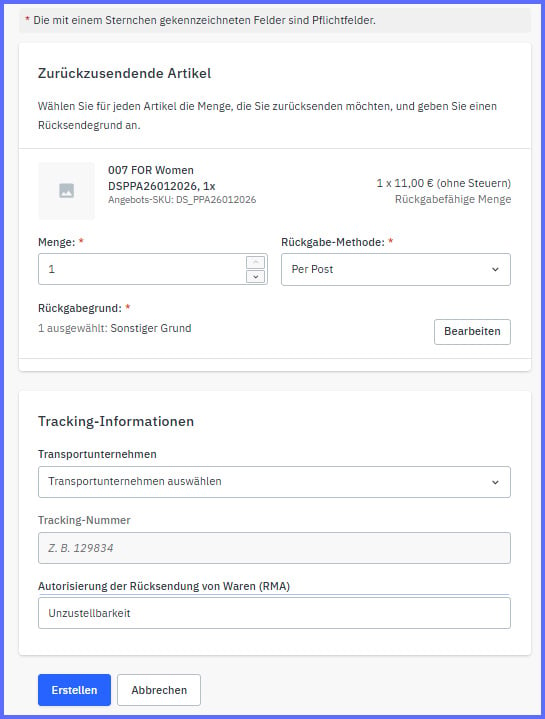
6. Select “Create”:
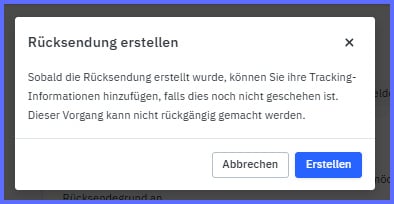
7. Return has been created:
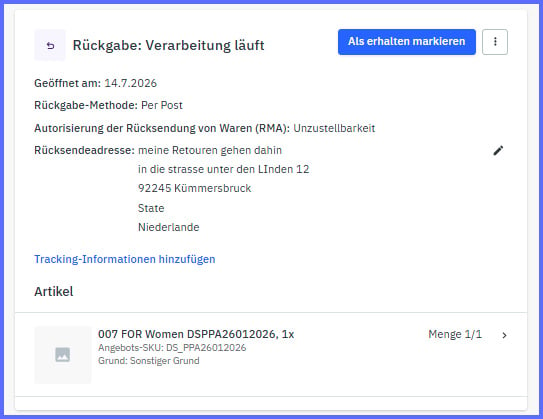
Extract
RT01:
Create a return
Returns are generated using API RT01 (POST /api/returns) (create a Return Request, including the optional RMA field).
First, retrieve the permitted return details (quantity/reasons/methods) via API RT12 (to ensure the use of a valid reason_code/method_code and returnable_quantity).
Then create the return using RT01.
RT11:
Lists return requests and status.
RT04:
Update return information (e.g. RMA code).
Invoice from Conrad - One Creditor Model
Any questions? Get in touch: